WhatsApp CRM: quote, answer and follow up from your number
A WhatsApp CRM connects your WhatsApp chats with your customers, quotes and follow-ups. No sale gets lost among hundreds of messages.
Agroqs is a WhatsApp CRM for ag businesses. It connects your number, answers prices from your catalog, sends quotes as PDF and tells you who to follow up with.
What Agroqs does with your WhatsApp
| Feature | How it works |
|---|---|
| Connect your number | Scan a QR code from your phone and keep your same number. |
| Auto reply | Answers prices from your catalog and builds the quote. Anything it does not know goes to a rep. |
| Quotes on WhatsApp | Sent as a PDF with your logo, tax by line and validity. |
| Read alert | Tells you when the customer opens the quote. |
| Sort chats | Separate customers from personal chats so auto reply never answers family. |
| Orders | An accepted quote becomes an order with its delivery date. |
| Follow-up list | Each morning: who opened and did not reply. |
How a WhatsApp CRM differs from WhatsApp alone
| Task | WhatsApp alone | WhatsApp CRM |
|---|---|---|
| Find a customer | Scroll through chats | Search by name, crop or stage |
| Send a price | Type it by hand | Comes from your price list |
| Send a quote | Make a PDF somewhere else | Built and sent from the chat |
| Know who to call | Your memory | A follow-up list each morning |
| Share with the team | One phone, one person | Each rep sees their own customers |
| See results | No numbers | Quoted, won and lost by rep |
Who needs a WhatsApp CRM
- Businesses that get prices asked on WhatsApp every day: farm supply, produce and feed stores.
- Teams with more than one rep: the owner needs to see every open deal.
- Seasonal businesses: at planting time chats pile up faster than anyone can answer.
- Anyone who loses track of quotes: a quote with no follow-up is a lost sale.
Official API and linked device
There are two ways a CRM can connect to WhatsApp. The choice changes what you can do.
| Official Business API | Linked device | |
|---|---|---|
| Number | Often a new number registered for the API | Your current business number |
| Setup | Business verification and a provider | Scan a QR code from your phone |
| Message templates | Approved templates to start chats | Normal messages in open chats |
| Phone app | The number usually leaves the app | Keep using WhatsApp on your phone |
| Best for | Large volumes and marketing campaigns | Small teams that sell one chat at a time |
Agroqs uses the linked device way. Your customers keep writing to the number they already know.
A morning with a WhatsApp CRM
- 7:00: the follow-up list shows four quotes opened yesterday with no reply.
- 7:15: you send each one a short follow-up from your phone.
- 8:30: auto reply has already answered six price questions and built two quotes.
- 9:00: one quote needs freight. You reply with the cost and it goes out.
- 11:00: a grower accepts. The order appears with its delivery date.
- 18:00: the day closes with quotes sent, won and lost by rep.
How to start with a WhatsApp CRM
- Upload your products and prices from Excel.
- Connect your business number by scanning the QR code.
- Sort your chats so personal contacts stay out.
- Turn on auto reply for price questions.
- Send your first quote from the CRM and watch for the read alert.
- Check the follow-up list every morning.
What to measure
| Number | What it tells you |
|---|---|
| Time to first reply | Whether customers wait too long for a price |
| Quotes sent | How much demand you are getting |
| Quotes opened | Whether customers are reading your offers |
| Close rate | How many quotes become sales |
| Loss reasons | Price, stock or freight: what to fix first |
Mistakes with WhatsApp sales
- Sending prices as plain text: the customer cannot find them a week later.
- Bulk messages to everyone: customers report them and the number is at risk.
- Auto reply that guesses: it should hand off anything it does not know.
- No follow-up after the quote: most customers need a second message to decide.
WhatsApp CRM features compared
| Feature | Why it matters | Agroqs |
|---|---|---|
| Shared inbox | The team answers from one number | Each rep sees their customers' chats |
| Contact record | History in one place | Quotes, messages and orders together |
| Quotes from the chat | The sale closes on a price | PDF quote with tax by line |
| Auto reply | Answers while you are busy | Prices from your catalog, hands off the rest |
| Read alerts | Know when to follow up | Yes, when the quote is opened |
| Broadcast campaigns | Marketing to many | No: Agroqs does not send mass messages |
Is there a free CRM for WhatsApp
The WhatsApp Business app is free and has labels, greeting messages and quick replies. It does not build quotes or track follow-ups.
Many CRMs have a free trial. Agroqs has a free trial with your own products and number.
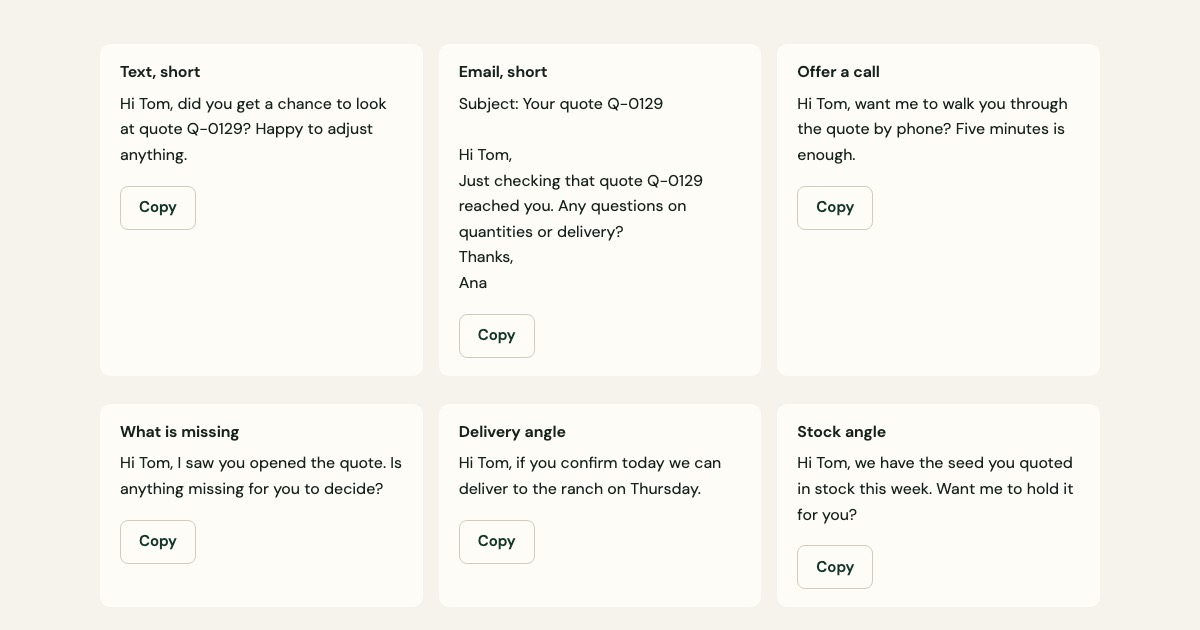
Messages your team will send every day
Quote sent
Hi Tom, here is your quote QT-0129 as a PDF. It is valid for 7 days.
Follow-up
Tom, did you get a chance to look at the quote? Happy to adjust quantities.
Order confirmed
Thanks, Tom! Order confirmed for Thursday delivery.
Handoff
Let me check with the manager and get back to you today.
Rules for WhatsApp sales that keep your number safe
- Message customers who wrote to you or who expect your quote.
- Do not send the same promotion to hundreds of contacts.
- Let customers ask you to stop and respect it.
- Keep personal chats out of the CRM.
What to check before choosing a WhatsApp CRM
- Your own number: customers already have it saved.
- No replies to personal chats: an auto reply to your family looks bad.
- Real quotes, not just chat: the deal closes on a price.
- Industry fit: bags, tons and credit prices do not come in a general CRM.
- No mass messaging: bulk campaigns put your number at risk.
How a sale works with Agroqs and WhatsApp
- The customer writes: “How much for urea? I need 7 tons.”
- Auto reply answers with your catalog price and asks about pickup or delivery.
- The customer asks for delivery to the ranch.
- Agroqs builds the quote with freight and waits for your approval.
- You reply “send” and the quote goes out as a PDF.
- Agroqs tells you when the customer opens it.
- The customer accepts and the order is created with its delivery date.
Options compared
| Option | Best for |
|---|---|
| WhatsApp Business app alone | Few chats a day and no quotes. |
| General CRM with WhatsApp | Any industry with many chats and a custom pipeline. |
| Agroqs | Ag businesses that quote changing prices over WhatsApp. |
Agroqs does not send mass campaigns and does not use the WhatsApp Business API. It connects to your business number like another linked device. The Agroqs app is in Spanish today.
Common questions
Which CRM has WhatsApp built in?
Agroqs connects to your number by QR code. Several general CRMs also offer WhatsApp integrations.
Do I need the WhatsApp Business API?
Not for Agroqs. It connects to your existing number by scanning a QR code.
Connect your WhatsApp and send your first quote from Agroqs today.
Try Agroqs freeFrequently asked questions
What is CRM for WhatsApp?
A system connected to your WhatsApp that keeps each customer, their chats, their quotes and the follow-up of the sale.
Is there a free CRM for WhatsApp?
Yes, several tools have free plans or trials. Agroqs has a free trial with your own products and number.
Which CRM is best for integrating with WhatsApp?
It depends on your business. For ag businesses that quote over WhatsApp, Agroqs comes ready with units, credit prices and freight.
Updated November 12, 2026