Delivery receipt template: fill it in and print it free
A delivery receipt is the form the customer signs when goods arrive. It lists what was delivered, how much, and that it arrived in good condition.
Fill in the form below and download it as PDF, Word or Excel with lines for both signatures.
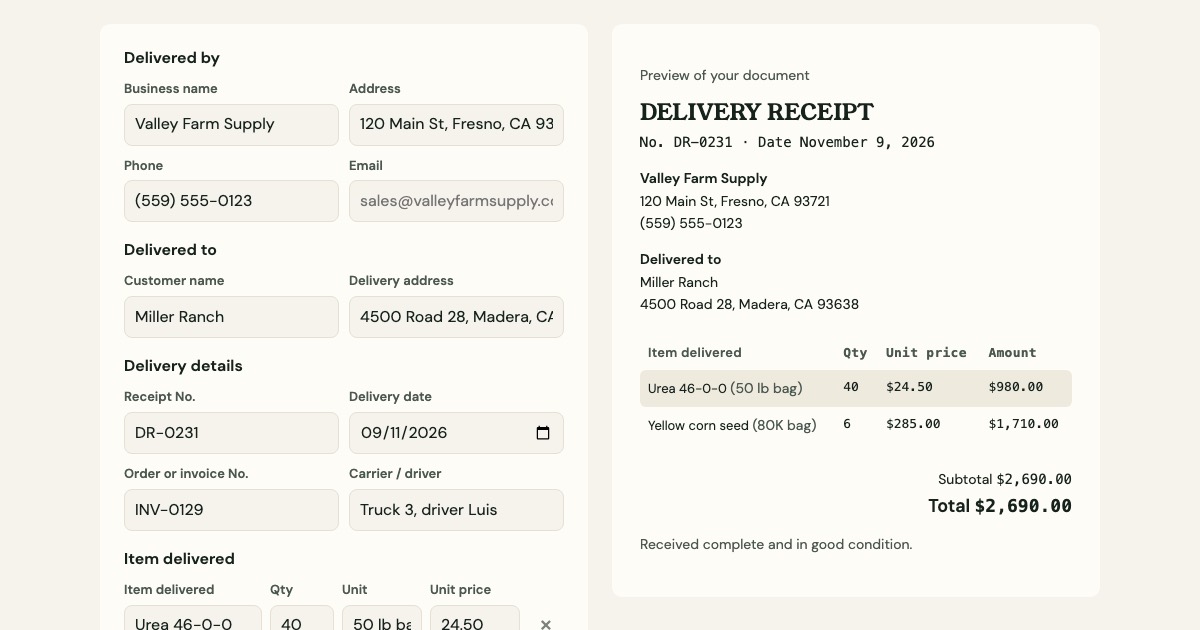
What a delivery receipt includes
| Field | Example |
|---|---|
| Receipt number and date | DR-0231, November 9, 2026 |
| Delivered by | Valley Farm Supply |
| Delivered to and address | Miller Ranch, 4500 Road 28, Madera, CA |
| Order or invoice number | INV-0129 |
| Items, quantity and unit | 40 bags of urea, 50 lb |
| Carrier or driver | Truck 3, driver Luis |
| Condition on arrival | Received complete and in good condition |
| Signatures | Delivered by and received by |
How to use a delivery receipt
- Fill in the receipt before the truck leaves.
- Print two copies: one for you and one for the customer.
- Have the customer count the items and note any damage.
- Get the customer signature and name on both copies.
- File your copy with the invoice for that order.
Delivery receipt example from a farm supply store
| Item | Quantity | Unit | Condition |
|---|---|---|---|
| Urea 46% | 40 | Bag, 50 lb | Complete |
| Seed corn | 12 | Bag, 80K seeds | Complete |
| Herbicide | 6 | Jug, 2.5 gal | 1 jug leaking, returned |
The customer signs and writes the damaged item in the condition column.
Why use a delivery receipt
- Proof of delivery: the signature shows the customer received the goods.
- Fewer disputes: damage and shortages are written down on the spot.
- Faster payment: the invoice is easier to collect with a signed receipt.
- Driver accountability: each delivery has a name and a time.
- Inventory accuracy: what left the warehouse matches what arrived.
Who uses delivery receipts
| Business | Typical use |
|---|---|
| Farm and ranch supply stores | Bulk fertilizer, seed and feed delivered to the farm |
| Produce distributors | Daily deliveries to stores and restaurants |
| Feed mills | Loads delivered by weight |
| Contractors | Materials delivered to a job site |
How to create proof of delivery
- Use the same receipt number as the order or invoice.
- List each item with quantity and unit as it was loaded.
- Have the customer count the items before signing.
- Write any damage or shortage next to the item.
- Add the time of delivery and the printed name of the receiver.
- Take a photo of the signed receipt and send it with the invoice.
Tips for a clear delivery receipt
- Use the units the customer ordered: bags, pallets or tons.
- Leave a wide space for notes about condition.
- Print the receiver name under the signature line.
- Keep it to one page so it is signed, not skipped.
Paper, PDF or app
A printed receipt works when drivers have no signal on the farm. A PDF is easy to email after the delivery.
Download the template from this page in Word to add your logo, or in Excel to keep a log of deliveries.
Delivery receipt, packing slip and invoice
| Document | What it shows |
|---|---|
| Packing slip | What is inside the shipment. |
| Delivery receipt | That the customer received it and in what condition. |
| Invoice | What the customer owes. |
Messages for delivery day
Before the truck leaves
Hi Tom, your order leaves at 8:00 with delivery receipt DR-0231. Who will receive it at the farm?
At delivery
Delivered: 40 bags of urea, 12 bags of seed and 5 jugs of herbicide. Photo of the signed receipt attached.
Shortage
Tom, one jug was leaking and came back with the driver. It is noted on the receipt and we will bring a new one tomorrow.
Backorder
Hi Tom, we delivered 12 of the 20 bags of seed corn today. The other 8 arrive by November 16 on a second receipt.
No one at the farm
Hi Rosa, we left 30 bags of feed at the north barn at 2:15 p.m. Photos attached. Can you reply to confirm you got them?
Delivery receipt with several stops
When a truck makes several stops, use one load sheet for the truck and one delivery receipt per customer.
| Stop | Customer | Items |
|---|---|---|
| 1 | Miller Farms | 57 |
| 2 | Ortega Ranch | 30 |
| 3 | Green Valley Produce | 12 |
| Load total | 99 |
Example load sheet with three stops.
How to fill in each section
| Section | How to fill it | Mistake to avoid |
|---|---|---|
| Receipt number | Next number in your series, or the invoice number with a suffix such as INV-0129-D | Two receipts with the same number |
| Date and time | The moment the goods were handed over, such as 10:40 a.m. | The date the order was taken |
| Delivered by | Your business name and the driver or carrier | Leaving out the carrier when a third party hauls it |
| Delivered to | Customer name and the exact drop point, such as the north barn | Only the billing address |
| Order reference | PO, quote or invoice number | No reference at all |
| Items | Description as it appears on the order | Codes the customer does not know |
| Quantity and unit | 40 bags of 50 lb, 2 pallets, 10.6 tons | Quantity without a unit |
| Condition | Complete, or the exact exception per item | Writing «OK» when something is short |
| Received by | Signature plus printed name and role | An unreadable signature with no name |
Exceptions: write them before signing
An exception is anything that differs from the order. Write it on the receipt while the driver is still there.
| Exception | What to write | Example |
|---|---|---|
| Shortage | Item, quantity ordered and quantity received | Seed corn: 12 ordered, 11 received |
| Damage | Item, quantity and type of damage | Herbicide: 1 jug leaking |
| Refused | Item, quantity and reason | 6 cases of strawberries refused, soft fruit |
| Wrong item | What arrived instead of what was ordered | 28-0-0 delivered instead of 32-0-0 |
| Overage | Extra items received | 2 extra bags of urea, returned with the driver |
A receipt signed «complete» with no notes makes a later claim much harder. Count first, write the exception, then sign.
Delivery receipt for bulk loads by weight
Bulk fertilizer, feed and grain move by weight. Attach the scale ticket and copy the net weight onto the receipt.
| Line | Weight |
|---|---|
| Gross weight, loaded truck | 52,400 lb |
| Tare weight, empty truck | 31,200 lb |
| Net weight delivered | 21,200 lb (10.6 tons) |
Example scale ticket for a load of urea. Net weight is gross minus tare.
Write the scale ticket number on the receipt. The customer can then match it with the invoice that bills 10.6 tons.
Delivery receipt for produce
Produce buyers check temperature and quality on arrival. A produce receipt needs a few extra lines.
- Cases by item and pack: 120 cases of strawberries, 8 x 1 lb.
- Temperature on arrival: read and written by the receiver.
- Rejected cases and reason: 6 cases refused for soft fruit.
- Accepted cases: 114 cases, the number the invoice will bill.
- Time at the dock: arrival and unloading time.
Who needs a delivery receipt and who does not
You need one if you deliver goods with your own trucks, sell on credit or deliver bulk loads by weight. It also helps when someone other than the buyer receives the goods.
You may skip it if the customer picks up at the counter and pays on the spot. The sales receipt already shows what left the store.
Paper copies: who keeps which
Many stores print delivery receipts on two-part or three-part carbonless forms. Each copy has a job.
| Copy | Who keeps it | What it is for |
|---|---|---|
| White | Customer | Their record of what arrived |
| Yellow | Office | Attached to the invoice |
| Pink | Driver | Proof the stop was made |
With a PDF, send the signed copy to the customer and file yours with the invoice. The driver keeps a photo.
Which file format to download
| Format | Best for |
|---|---|
| Printing the same layout every time and emailing it | |
| Word | Adding your logo, terms or extra fields |
| Excel | Keeping a log of deliveries and totals by customer |
Photo proof and signatures on a phone
A photo of the signed receipt, the unloaded goods and the drop point closes most questions. Phones also record the time of each photo.
- Photograph the goods after unloading.
- Photograph any damaged item next to the receipt.
- Photograph the signed receipt.
- Send the photos to the office and to the customer the same hour.
What to do after a shortage or damage
- Confirm the exception is written on the receipt.
- Tell the office before the driver leaves the next stop.
- Issue a credit or schedule a replacement delivery.
- Send the customer the new date or the credit number.
- If a carrier hauled it, file the claim with the carrier using the signed receipt and photos.
Is a signed delivery receipt enough proof
It is the record both sides signed at the moment of delivery. Businesses use it to show what arrived, when and in what condition.
It works best with a clear order reference, a printed receiver name and photos. For a large dispute, ask a lawyer how your state treats it.
Driver checklist at each stop
- Check the customer name and drop point on the receipt.
- Unload and let the receiver count.
- Write exceptions next to each item.
- Get the signature, printed name and time.
- Leave the customer copy and photograph yours.
Backorders and split deliveries
When part of an order is out of stock, deliver what you have and say what is still coming.
| Item | Ordered | Delivered today | Backorder |
|---|---|---|---|
| Seed corn, 80K bag | 20 | 12 | 8, by November 16 |
| Urea 46%, 50 lb bag | 40 | 40 | 0 |
Example. The second delivery gets its own receipt that references the same order.
Bill only what was delivered, or bill it all and note the backorder on the invoice. Pick one rule and keep it.
When nobody is there to sign
Farm deliveries often arrive when the crew is in the field. Agree on a drop rule before the truck leaves.
- Ask the customer in writing where to leave the goods.
- Unload at that exact spot.
- Write «left at north barn, no one present» and the time on the receipt.
- Photograph the goods and the receipt left with them.
- Text the photos to the customer and ask for a reply confirming receipt.
The customer reply then works as the signature. Save it with the receipt.
Key terms
| Term | Meaning |
|---|---|
| Consignee | The person or business receiving the goods |
| Shipper | The business sending the goods |
| Carrier | Whoever moves the goods, your truck or a hauler |
| POD | Proof of delivery, often the signed receipt |
| Exception | Any shortage, damage or difference noted at delivery |
| Backorder | Items that will arrive in a later delivery |
| Bill of lading | The carrier document that travels with a shipment |
Keep a delivery log in Excel
Download the Excel version and add one row per delivery. Over a season it answers most customer questions in seconds.
| Date | Receipt | Customer | Items | Exceptions | Signed by |
|---|---|---|---|---|---|
| Nov 9 | DR-0231 | Miller Ranch | 57 | 1 jug leaking | Tom Miller |
| Nov 9 | DR-0232 | Ortega Ranch | 30 | None | Rosa Ortega |
| Nov 10 | DR-0233 | Green Valley Produce | 12 | None | J. Park |
Example log for the three-stop load above.
Common questions
Does a delivery receipt need prices?
No. Many businesses list only items and quantities. Add prices if you also use it to bill.
Who signs a delivery receipt?
The person who delivers and the person who receives. Write both names next to the signatures.
Can the driver sign for the customer?
No. The receiver signs. If nobody is there, follow the drop rule above and get a written reply from the customer.
How many copies should I print?
Two at least: one for the customer and one for your office. Print a third if the driver turns in paperwork at the end of the day.
Should the receipt number match the invoice?
It helps. Use the invoice number with a suffix, or write the invoice number on the receipt.
In Agroqs an accepted quote becomes an order with its delivery date.
Try Agroqs freeFrequently asked questions
How do I create a delivery receipt?
List the items, quantities and units delivered, the order number and the delivery address, then get both signatures. The template on this page does it.
What is a delivery receipt?
It is the form the customer signs to confirm they received the goods, how many and in what condition.
How do I create Proof of Delivery?
Fill in a delivery receipt with items and quantities, have the customer check and sign it, and keep a copy with the invoice.
Is there a receipt template in Word?
Yes. The delivery receipt on this page downloads in Word, PDF and Excel.
Updated November 13, 2026